
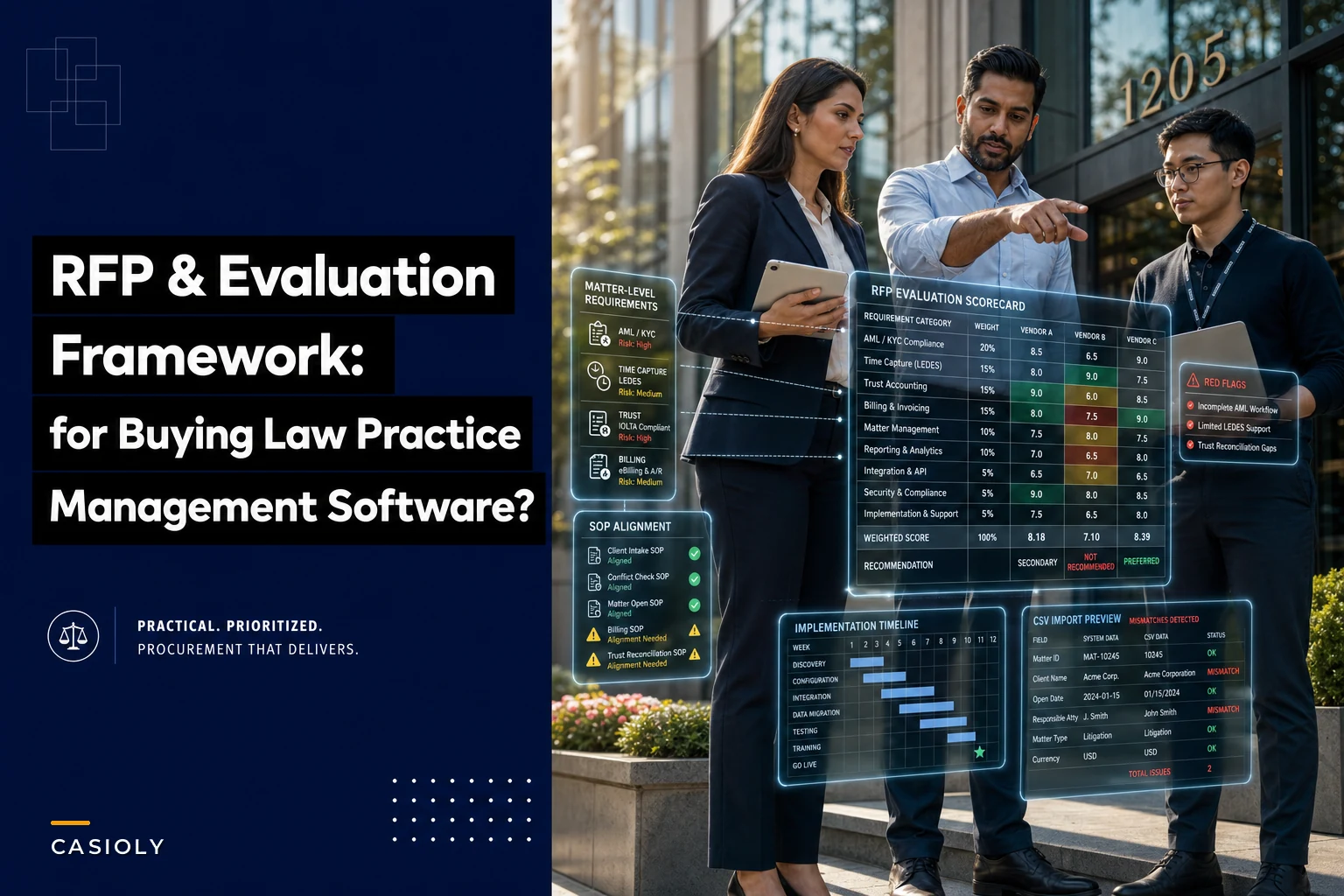

Most LPMS purchases fail quietly. Not dramatically — the contract gets signed, the demo looked good, two partners nodded along. Then eighteen months later nobody trusts the trust ledger, time capture is still happening in a spreadsheet, and the finance team keeps pulling data into Excel because the reporting module "doesn't match how we actually bill."
The problem almost never comes down to the software being bad. It comes down to the firm buying against a feature list instead of against its own operational reality. A tool that works great for a 12-person plaintiff shop will quietly suffocate a 60-lawyer firm with insurance panel clients and LEDES requirements. The RFP is where you catch that — if you run it properly.
This is a vendor-agnostic framework you can lift and adapt. It assumes you already know what a matter is, why trust accounting matters, and that "it integrates with Outlook" is not a differentiator. The goal is to help you score law practice management software against the workflows your firm actually runs, not against a glossy capabilities grid.
Start with your firm profile, not the feature list
The single biggest mistake in LPMS procurement: building the requirements document by collecting feature requests from everyone. You end up with 140 "must-haves," most of which are one partner's pet preference, and no real way to tell what actually protects the firm.
Flip it. Start with a firm profile, because your profile determines which risks are expensive for you specifically.
Work through these before you write a single vendor question:
-
Headcount and growth curve. Are you 25 timekeepers holding steady, or 40 heading to 70 in two years? Scaling firms need permissions and matter governance to hold up under volume. Stable firms can prioritize depth over elasticity.
-
Practice mix. Transactional, litigation, or blended? Litigation-heavy firms live and die on calendaring and deadline integrity. Transactional firms care more about precedent reuse and document assembly.
-
Billing complexity. Flat fee, hourly, contingency, or some combination of all three? If any meaningful share of your revenue runs through insurer or corporate panels, LEDES handling moves from "nice" to non-negotiable.
-
Trust exposure. How many trust accounts, how much third-party money, how often do you disburse? High trust volume raises the cost of a weak trust module dramatically.
-
Current pain. Where does work actually leak today — unbilled time, slow collections, intake bottlenecks, reconciliation headaches?
A simple priority-setting worksheet
Score each operational area 1–5 on two axes: financial/risk exposure and current pain. Multiply them. Anything scoring 15+ becomes a weighted must-have in your scoring matrix.
| Operational area | Risk exposure (1–5) | Current pain (1–5) | Priority score |
|---|---|---|---|
| Intake / conflicts / AML-KYC | 5 | 4 | 20 |
| Trust & retainer management | 5 | 3 | 15 |
| Time capture | 4 | 5 | 20 |
| Billing & collections | 4 | 4 | 16 |
| LEDES / e-billing | 5 | 2 | 10 |
| Precedent / document assembly | 2 | 4 | 8 |
| External counsel coordination | 3 | 3 | 9 |
| Integrations & data governance | 4 | 3 | 12 |
The numbers above are illustrative — your firm's grid will look different, and that's the point. A firm with no panel work would drop LEDES down to a 4 or 5 on priority. A contingency shop might push trust exposure to the top. The worksheet forces you to admit what matters here, which is exactly what stops the 140-item wishlist from taking over.
Must-have features, mapped to the risks they actually control
Intake & AML/KYC The risk: taking on a client you shouldn't, or missing a conflict until you're three weeks in. The software needs structured intake forms, a conflicts database that searches across former and adverse parties, and the ability to block matter opening until KYC steps are complete. If you've already built a tight onboarding process — and if you haven't, the AML/KYC client-onboarding workflow tied to matter intake approach is worth reviewing — the LPMS should enforce it, not bypass it.
Never miss a critical deadline again.
Casioly helps legal teams manage cases efficiently and stay on top of critical tasks.
- Centralized case tracking
- Automated deadline reminders
- Secure client communication
No credit card required
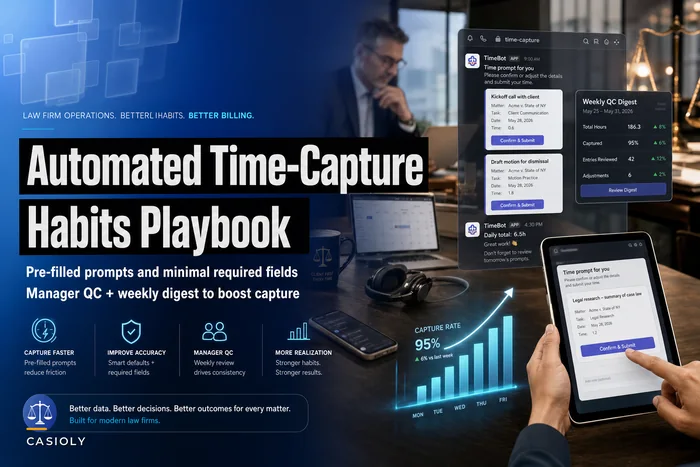
Time capture & LEDES The risk: revenue that never gets recorded, and e-bills that get rejected by the client's billing platform. You want passive capture, mobile entry, and timers that survive a browser crash. For panel work, native LEDES 1998B/2000 export with pre-submit validation is mandatory. A tool that captures time but exports LEDES with invalid task codes will cost you more in rework than it ever saves. The habits side of this matters too — software supports but doesn't replace the discipline covered in the automated time-capture habits playbook.
Trust / retainers The risk: commingling, overdraw, or a reconciliation that doesn't tie out at month-end. Non-negotiables: separate trust ledgers per client/matter, automatic holds when a retainer hits a floor, three-way reconciliation support, and an audit trail you can hand a bar examiner without hesitation.
Billing & collections The risk: slow cash and pre-bill errors going out the door. Look for configurable bill formats, pre-bill review workflows, aging reports by matter and responsible attorney, and automated reminder sequencing.
External counsel & precedent libraries The risk: inconsistent outside-counsel billing and reinventing documents that already exist somewhere in the firm. You want vendor billing reconciliation, and a precedent library with real version control and taxonomy — not a shared drive full of files named "FINALv7actualfinal."
Integrations & governance The risk: data drift between systems and nobody owning the truth. Prioritize documented APIs, field-level permissions, and clean exports.
The vendor question bank
Send these in writing and require written answers. Live demos reward the vendor's best demo-er, not their best product. Score the written responses first.
-
Describe your trust accounting module — does each matter get a separate ledger, and how is three-way reconciliation handled?
-
What happens, step by step, when a retainer drops below a set threshold?
-
Which LEDES formats do you export natively, and do you validate task/activity codes before export?
-
How does passive time capture work, and what data sources does it pull from?
-
Can matter opening be blocked until defined intake/KYC steps are complete?
-
How does your conflicts search work across historical and adverse parties?
-
What field-level permission controls exist, and can we restrict by matter, practice group, and role?
-
Walk us through your pre-bill review workflow.
-
How are aging reports generated, and can they be segmented by responsible attorney?
-
What is your document versioning model for the precedent library?
-
How do you handle external/outside counsel invoice reconciliation?
-
What is included in your standard data export, and in what formats?
-
If we leave, what exactly do we get back, in what structure, and how long does extraction take?
-
Describe your API — is it documented, rate-limited, and do you charge per call?
-
Which third-party systems do you have prebuilt, supported integrations with?
-
What is your uptime SLA and what's the remedy when you miss it?
-
How are software updates deployed, and can they break our configurations?
-
What does your audit log capture, and can it be exported?
-
Describe your data residency and encryption at rest and in transit.
-
What is the real implementation timeline for a firm our size, with references?
-
What are all the costs — per user, storage, integrations, support tiers, migration, overages?
-
How do you price additional modules, and which features are add-ons vs. core?
-
Who owns the data migration, you or us, and what's the fixed vs. estimated cost?
-
Can we speak to two firms your size that left a competitor for you in the last 18 months?
Question 24 is the one most firms skip and later regret. A reference who switched tells you more than a happy long-term customer who's never considered leaving.
Scoring matrix with weightings
Don't score out of a flat 100. Weight categories by your priority worksheet, then score each vendor 1–5 per category and multiply.
| Category | Weight | Vendor A (1–5) | Vendor A weighted | Vendor B (1–5) | Vendor B weighted |
|---|---|---|---|---|---|
| Trust & retainers | 20% | 5 | 1.00 | 3 | 0.60 |
| Time capture & LEDES | 20% | 4 | 0.80 | 4 | 0.80 |
| Intake / AML-KYC | 15% | 3 | 0.45 | 5 | 0.75 |
| Billing & collections | 15% | 4 | 0.60 | 4 | 0.60 |
| Integrations & governance | 12% | 4 | 0.48 | 3 | 0.36 |
| Data portability | 10% | 2 | 0.20 | 4 | 0.40 |
| Precedent / docs | 8% | 3 | 0.24 | 2 | 0.16 |
| Total | 100% | 3.77 | 3.67 |
Set hard thresholds before you score, not after. Anything below 3.5 overall drops out. Any single category scoring a 2 or below in trust, LEDES, or data portability is an automatic disqualifier regardless of total — because a low score there means real money or real exposure, and a strong overall number can mask a fatal gap. In the table above, Vendor A wins on points but scored a 2 on portability, which should trigger a hard conversation before anything gets signed.
Implementation timeline template
A realistic rollout for a mid-size firm runs somewhere between 12 and 20 weeks. Compressing it is where adoption dies.
-
Weeks 1–2 Contract signed, project team named, success metrics agreed in writing.
-
Weeks 3–5 Data mapping and cleanup. This is where the hidden effort lives — bad legacy data takes longer to fix than the software takes to configure.
-
Weeks 6–8 Configuration of matter types, bill formats, trust rules, permissions.
-
Weeks 9–10 Migration dry run with a data sample, then reconciliation against the old system.
-
Weeks 11–13 Pilot with one practice group. Capture friction, fix, repeat.
-
Weeks 14–16 Firm-wide training in short role-based sprints.
-
Weeks 17–20 Go-live, parallel-run finance for one full billing cycle, then cut over.
Visualize the rollout phases with this simple workflow.
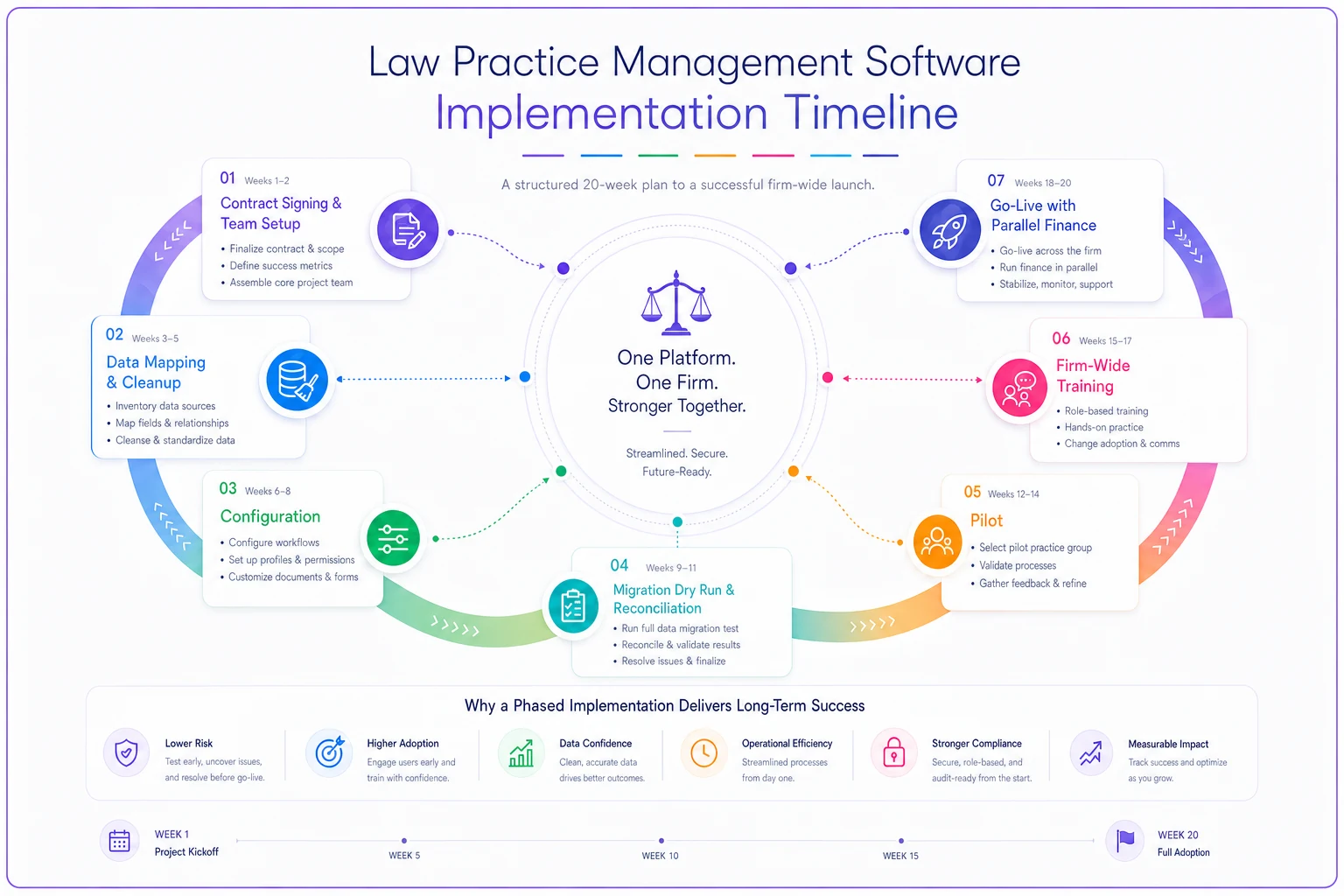
Run finance in parallel through at least one complete month-end and billing cycle. The number of firms that skip this and discover a trust reconciliation mismatch in month two is depressingly high.
Cost / ROI model
Sticker price is the smallest part of total cost of ownership. Build the real number.
TCO over 3 years includes:
-
Per-user licensing (watch for tiered pricing that jumps at headcount thresholds)
-
Storage and overage fees
-
Integration/API costs
-
Support tier (premium support is often where real responsiveness actually lives)
-
Migration — frequently somewhere between $8k and $25k for a mid-size firm depending on data condition
-
Internal staff time during implementation — real, and usually unbudgeted
On the return side, model conservatively:
-
Recovered time. If better capture lifts billable recording even 2–4 minutes per timekeeper per day across 40 people, that's a meaningful annual recovery — run it at your blended rate and discount it, because not all captured time bills.
-
Faster collections. Shaving a week or two off average days-to-payment improves cashflow even if realization stays flat.
-
Reduced LEDES rejections. Each rejected e-bill cycle is staff time plus delayed cash.
A realistic model looks something like this: roughly $60k–$90k in three-year TCO against recovered time and faster cash that, conservatively discounted, lands north of that by year two. If the ROI only pencils out under optimistic assumptions, treat that as a warning sign.
Red-flag checklist: licensing, support, and data portability
Walk away, or renegotiate hard, if you see:
-
Data export limited to PDF or locked formats. If you can't get your matters, ledgers, and documents out in structured, usable form, you don't own your data — they do.
-
Migration-out fees or vague answers about what you get back if you leave.
-
Per-API-call pricing that makes integrations economically painful at scale.
-
Support only via ticket with no SLA and no phone escalation for trust/billing emergencies.
-
"Custom development required" for features that were demoed as standard.
-
Auto-renewing multi-year contracts with narrow cancellation windows.
-
Updates that overwrite configuration without a sandbox to test first.
-
No named reference at your size and complexity.
The portability issue is the one that compounds. Firms accept a weak export clause to get a lower price, then find themselves effectively hostage at renewal. Negotiate data portability terms before signing, when you still have leverage.
Appendix: mapping requirements to your internal SOPs
Procurement goes wrong when the software quietly contradicts the playbooks your firm already runs. Before final selection, map each major requirement to the SOP it has to support — and confirm the tool enforces that SOP rather than forcing a workaround.
| Requirement | Related internal SOP | What to verify |
|---|---|---|
| Intake blocking | AML/KYC onboarding workflow | Matter cannot open until KYC steps complete |
| Trust ledgers | Matter-level trust reconciliation | Three-way reconciliation ties out at month-end |
| LEDES export | Matter-level LEDES compliance | Pre-submit validation catches bad codes |
| Time capture | Automated time-capture habits | Prompts and QC fit existing weekly review |
| Permissions | Matter governance / access controls | Field-level restriction by role and group |
| Risk scoring | Matter-risk control matrix | Stage-level controls can be tracked in-system |
If you've already built a control framework like a matter-risk control matrix with stage-level scoring, the LPMS should slot into it — tracking the controls you've already defined, not asking you to abandon them because "the system works differently."
A short real scenario
A roughly 45-timekeeper litigation-and-transactional firm ran a selection the usual way first: three demos, a partner vote, done. They picked on feature breadth. Within a year, finance was still exporting to Excel for every e-bill because LEDES validation wasn't actually native, and two timekeepers had quietly gone back to paper time sheets.
They restarted using a weighted matrix and written vendor answers. The highest-scoring vendor on raw features dropped out — scored a 2 on data portability and dodged the migration-out question twice. The firm picked the number-two option: slightly fewer features, clean export terms, real LEDES validation.
First full billing cycle after go-live, e-bill rejections fell from a steady handful each cycle to nearly zero, and days-to-payment on panel work tightened by roughly two weeks. Nothing dramatic. Just a system that finally matched how they actually worked.
The one thing to take away
The best law practice management software for your firm is the one that enforces the operations you've already decided are correct — not the one with the longest feature list or the smoothest demo. Build the profile first, weight the risks that are expensive for you, demand written answers, and don't let a strong total score paper over a fatal gap in trust, LEDES, or data portability. Run the RFP like you'd run a matter: define the scope, document the evidence, and don't sign until the reconciliation ties out.
Ready to elevate your legal practice management?
Join 500+ law firms using Casioly to optimize case workflows, reduce administrative burden, and improve client satisfaction.