

Most firms don't have a precedent problem. They have a findability and trust problem.
Walk into almost any 6-to-15 lawyer firm and you'll find the same thing: a shared drive with 40 different versions of an employment agreement, three folders named "Templates," "TEMPLATES (USE THESE)," and "Templates_old," and at least one associate who quietly built a personal stash of clauses in their Outlook drafts because they don't trust anything on the server. Everyone knows the good precedents exist somewhere. Nobody can say with confidence which version is current, who approved it, or whether it's been superseded by something the partner drafted last quarter.
The result isn't just wasted time. It's risk. Someone eventually reuses a clause that was retired for a reason, and now you're explaining to a client why their contract references a statute that changed 18 months ago.
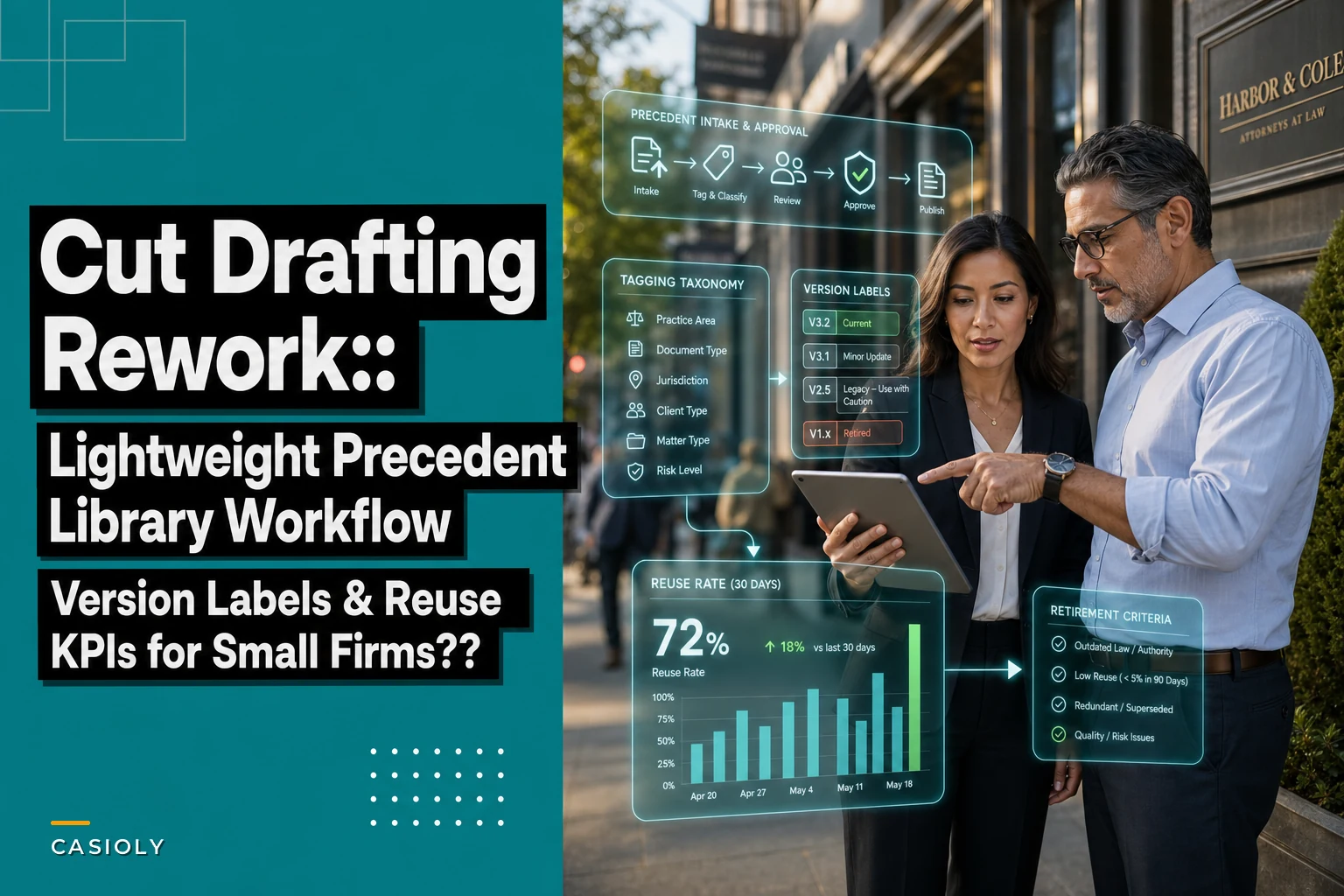
This post is about one narrow fix: building a precedent library workflow light enough that a small firm will actually use it. Not a knowledge-management megaproject. A tagging system, version-label rules, retirement criteria, and a single KPI that tells you whether any of it is working.
Why the drive-full-of-templates approach quietly fails
The failure isn't laziness. It's that most template collections grow by accretion, never by design.
A partner drafts a strong indemnification clause for one matter. It's genuinely good, so it gets copied into the next similar matter. Then an associate tweaks it. Then someone copies the tweaked version, not realizing the partner's original was better. Six months later there are four variants floating around, all slightly different, none labeled, and the firm has no idea which one is the "real" one.
In practice, this usually shows up in three ways:
-
No single source of truth. The "best" version lives in someone's head or in a closed matter file, not in the library.
-
No approval gate. Anything can become a precedent just by existing long enough. Good and bad drafts get equal shelf space.
-
No expiration logic. Clauses tied to specific statutes, rates, or regulatory language sit in the library forever, silently going stale.
The deeper issue is trust. When lawyers can't trust the library, they stop using it — and every skipped use makes the library more outdated, which makes it less trustworthy, which drives more people away. That loop is what kills most template initiatives inside a year.
The whole workflow, before we break it down
Here's the shape of a lightweight system that survives contact with a busy practice:
Never miss a critical deadline again.
Casioly helps legal teams manage cases efficiently and stay on top of critical tasks.
- Centralized case tracking
- Automated deadline reminders
- Secure client communication
No credit card required
-
Intake — someone nominates a document or clause as a precedent candidate.
-
Tagging — it gets classified against a fixed taxonomy so it's findable.
-
Approval — a designated owner reviews and either approves, edits, or rejects it.
-
Version labeling — it gets a clear status label so nobody guesses whether it's current.
-
Retirement — it has explicit criteria for when it gets pulled or flagged for review.
-
Measurement — you track a reuse rate so you know whether the library is actually earning its keep.
A quick visual can make the steps easier to remember.
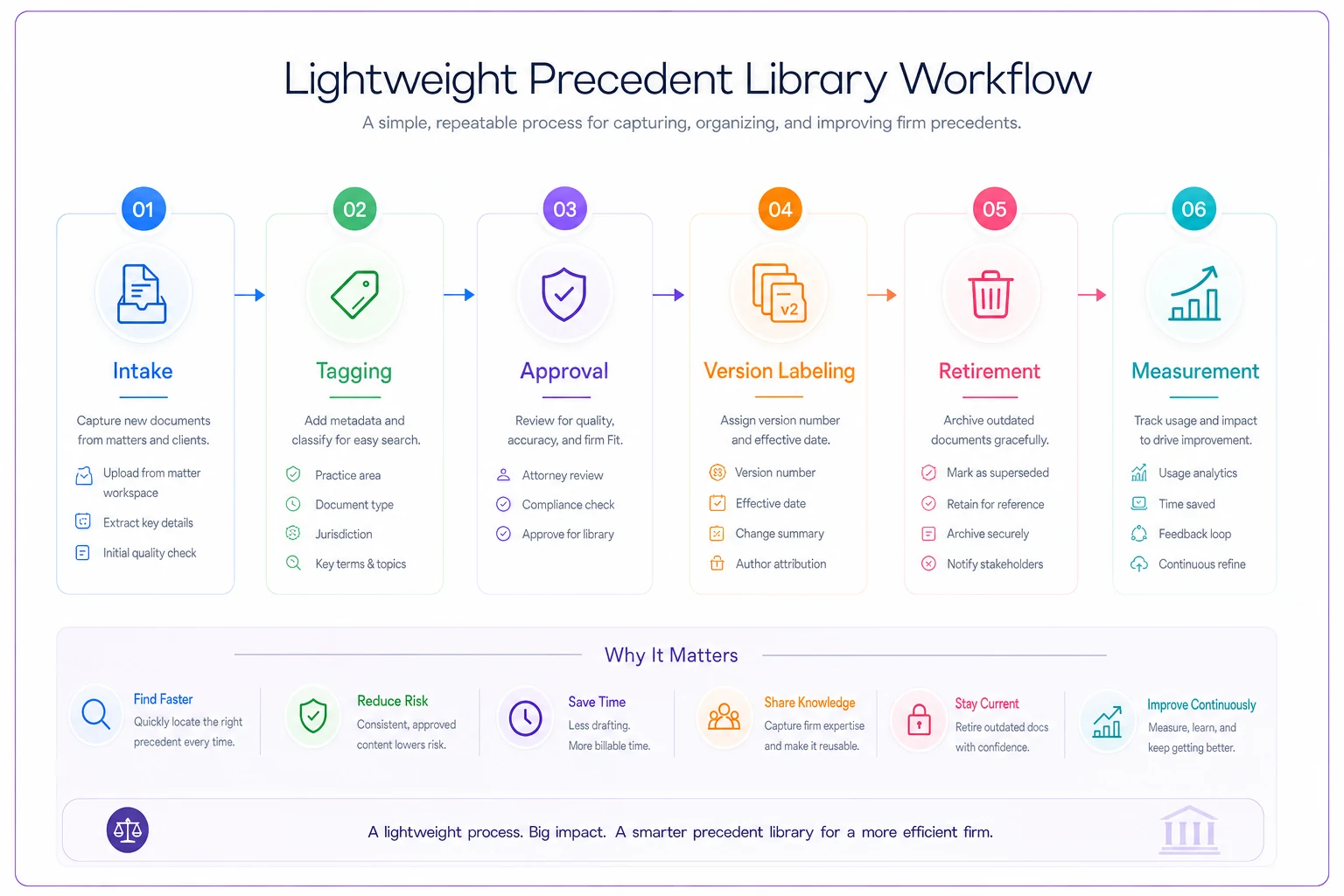
There's no full-time librarian role in there. That's deliberate. Small firms don't have one, and any workflow that assumes one will collapse the moment that person goes on leave.
Step 1: Intake that takes 90 seconds
The intake step should be almost frictionless, because friction is where adoption dies. The goal isn't to capture everything — it's to capture the good stuff someone actually thought was worth reusing.
A simple rule works well: any document or clause that gets reused, or that took real effort to draft well, is a candidate. The person who drafted or spotted it submits it with three pieces of information:
-
What it is (document type or clause type)
-
The matter it came from
-
One sentence on why it's worth keeping
That's it. No forms with 15 fields. If nominating a precedent takes longer than sending a two-line email, people won't do it.
Common mistake: treating intake as automatic capture of everything closed. Firms that dump every closed matter's documents into the library end up with a bloated, unsearchable mess — which is exactly the problem they were trying to solve. Curation is the point.
Step 2: A tagging taxonomy people can actually remember
Tags only help if they're consistent. The single biggest reason precedent libraries are unsearchable is that ten people invented ten different tagging vocabularies. One person tags "NDA," another "confidentiality agreement," another "conf. agrmt."
Fix this by defining a fixed, closed taxonomy. Nobody invents new tags on the fly. If a new category is genuinely needed, it goes through the owner. Keep it to a small number of dimensions — three or four is plenty:
| Dimension | Purpose | Example values |
|---|---|---|
| Practice area | Broad routing | Employment, Commercial, Real Estate, Litigation |
| Document type | What it is | Full agreement, Clause, Letter, Pleading, Checklist |
| Jurisdiction | Filters out irrelevant precedents | State/province, Federal, Multi-jurisdictional |
| Risk sensitivity | Flags high-review items | Standard, Partner-review-required |
The "risk sensitivity" tag is one most firms skip, and it's the one that saves you later. An indemnification cap or a liability waiver isn't the same as a standard notice provision. Tagging the sensitive ones means a junior lawyer knows instantly which clauses they can drop in and which ones need a second set of eyes.
Keep the taxonomy to three or four dimensions so it's easy for people to remember and apply consistently.
The taxonomy also connects directly to how the rest of your matter data is organized. If you've already built classification and access rules — the kind covered in a matter-linked governance and permissions playbook — your precedent tags should mirror that structure, not fight it. Two competing vocabularies is worse than one imperfect one.
Step 3: A one-owner approval gate
Every precedent needs an owner who says yes. This is the step that separates a real library from a shared folder.
For a small firm, the owner is usually a partner or senior associate per practice area. Their job on approval is narrow: confirm the document is (a) genuinely good, (b) current, and (c) tagged correctly. Approval isn't a full re-draft. It's a gate.
Here's a workable standard the owner runs each candidate through:
-
Is this better than what's already in the library for the same purpose? If not, reject or merge.
-
Is anything in it tied to a specific rate, date, or statute that will expire?
-
Does it contain any client-specific facts that need to be genericized before reuse?
-
Is the risk-sensitivity tag correct?
That third point matters more than people think. A surprising number of "precedents" still have the original client's name buried in a schedule, or a negotiated concession that was specific to one deal and shouldn't be baked into a template. The approval gate is where that gets caught.
A realistic approval example: an employment-practice owner gets three candidate non-compete clauses submitted over a month. Two are near-identical to what's already approved — she merges them and keeps the cleaner wording. The third has a tighter, better-drafted geographic-scope provision, so she approves it as the new standard and marks the old one for retirement. Total time: maybe 20 minutes across the month. That's the level of effort that's actually sustainable.
Step 4: Version labels that end the guessing
This is where most of the day-to-day pain lives, so it's worth being strict about.
Every precedent carries exactly one status label, and the labels are mutually exclusive:
-
Approved – Current — use this. It's the live version.
-
Draft – Under Review — a candidate that hasn't cleared the gate. Not for client use.
-
Superseded — replaced by a newer approved version. Kept for history, not for reuse.
-
Retired — pulled from active use. Do not use.
The rule that makes this work: there is only ever one "Approved – Current" version per precedent. The moment a new version is approved, the old one flips to Superseded automatically. No two documents should both claim to be current. When that rule slips, you're right back to the shared-drive chaos.
Pair the status with a plain version number and an approval date. "Employment Agreement — v3 — Approved 2024-09 — Current" tells a lawyer everything they need in one line. No opening the doc, no asking around, no guessing.
Keeping Superseded versions matters for a reason people underestimate: when a clause gets challenged, you often need to show what your standard language was at the time a document was drafted. That history is also useful when managing privilege and redaction decisions across older matters — the same discipline behind a solid privilege-log and redaction workflow applies here: keep the trail, label it clearly, and don't delete things just because they're old.
Step 5: Retirement criteria (the part everyone forgets)
A precedent library without retirement rules becomes a landfill. New versions pile on top of old ones, and eventually the good stuff is buried under things that should have been pulled years ago.
Retirement shouldn't be a vibe. Set explicit triggers:
-
Legal change — a statute, regulation, or leading case that the precedent relies on has changed.
-
Superseded — a better approved version now exists (auto-retire the old one).
-
Staleness clock — nothing's touched it or reused it in 18–24 months, so it gets flagged for owner review.
-
Defect found — a lawyer flags a problem, error, or ambiguity in active use.
The staleness clock is the quiet workhorse here. If a precedent hasn't been reused in two years, either it's genuinely obsolete or nobody can find it — and both are reasons to review it. A flag doesn't mean automatic deletion; it means the owner takes a 5-minute look and decides: keep, update, or retire.
Where firms get this wrong: they treat retirement as deletion. Don't delete. Move to Retired status. You lose valuable history when you delete, and history is exactly what you'll want the day a client questions old language.
Step 6: The one KPI that tells you if this is working
You can build the cleanest taxonomy in the world, but if nobody uses the library, it's decoration. The metric that actually matters is reuse rate.
At its simplest: of the documents your firm produced in a given period that could have started from an approved precedent, how many actually did?
> Reuse rate ≈ (matters/documents that started from an approved precedent) ÷ (total matters/documents of that type)
You don't need perfect data. A rough version works fine.
Track it per practice area, not just firm-wide, because averages hide problems. Your commercial practice might be reusing precedents on 70% of new agreements while litigation is at 15% — and that gap tells you exactly where the library is failing to serve people.
A small dashboard worth watching, refreshed monthly or quarterly:
| Metric | What it tells you | Watch for |
|---|---|---|
| Reuse rate by practice area | Whether the library is actually used | Any area under ~30% |
| Precedents approved this period | Whether the library is growing healthily | Zero = it's stagnating |
| Precedents retired this period | Whether stale content is being cleared | Zero over long stretches = landfill risk |
| Avg. time from intake to approval | Whether the gate is a bottleneck | Creeping past a couple of weeks |
| % of candidates rejected/merged | Whether curation is happening | Near 0% = you're hoarding, not curating |
The reject/merge rate is the sleeper metric. If your owner approves everything submitted, you don't have a library — you have a pile. Healthy curation means a meaningful share of candidates get merged into existing precedents or turned away. That selectivity is what keeps the library trustworthy over time.
A real scenario: a 9-lawyer commercial firm
A boutique commercial firm — nine lawyers, mostly transactional work — kept redrafting the same supply and services agreements. Every associate had their own "starting point," usually pulled from whatever recent deal they remembered. Partners were spending real time correcting the same drift over and over: inconsistent limitation-of-liability language, clauses that had been renegotiated for one client showing up as defaults elsewhere.
Nobody could say how bad it was until they roughly tallied it. On a typical mid-size commercial agreement, associates were burning somewhere in the 3–5 hour range on early drafting that mostly reinvented language the firm already had, well-drafted, in a closed matter file. Across the volume they were doing, that added up to a lot of low-value hours — either written off or quietly padding matters that clients didn't love paying for.
They built the workflow above over a few weeks. One partner owned the commercial precedents. They seeded the library with about a dozen genuinely good, approved templates and killed the duplicates. Version labels went on everything, and they started tracking reuse rate.
Within a quarter, early-stage drafting on standard agreements dropped from that 3–5 hour range to closer to an hour, because associates started from an approved base instead of a blank page or a half-remembered old file. Reuse rate on commercial agreements climbed from basically unmeasured to somewhere around 60–65%. Just as important, the partner stopped catching the same recycled mistakes, because the mistakes weren't in the library anymore.
It wasn't magic. It was mostly the version labels and the single-owner gate doing the quiet work of making people trust the library enough to actually reach for it first.
Where software helps — and when it isn't worth it yet
Where software helps — and where it doesn't
You can run this entire workflow in a spreadsheet and a shared folder if you're disciplined. Plenty of small firms do, and it beats chaos.
Where it gets fragile is enforcement. Keeping "only one Approved – Current version" true, auto-flipping old versions to Superseded, running a staleness clock, pulling a reuse-rate number without someone manually counting — that's where manual systems drift. A precedent library workflow built into your matter and document platform can handle the boring enforcement: applying status labels consistently, flagging precedents that hit their staleness date, and surfacing reuse rate without anyone building a report by hand.
That's the honest role for AI-assisted operational tools here — not to write your clauses, but to keep the library trustworthy by catching drift, tagging consistently, and prompting an owner when something's due for review. The judgment stays with the lawyer. The bookkeeping doesn't have to.
Don't buy tooling to fix a workflow you haven't defined yet, though. Software enforces rules; it doesn't invent them. If you haven't decided your taxonomy, your approval owner, and your retirement triggers, no platform will save you. Get the process right first, then let the tools maintain it.
When this is worth it — and when it isn't
Worth building now if:
-
You do repeat work — transactional, employment, standard commercial agreements.
-
You've caught recycled errors or stale clauses in client documents.
-
Associates are visibly redrafting things the firm already has.
Probably not worth it yet if:
-
Your work is almost entirely bespoke litigation with little reusable language.
-
You're a two-person firm where everyone already knows where the good stuff is.
-
You'd build the system but have nobody willing to own the approval gate — in which case, fix that first, because an unowned library rots faster than no library at all.
If you're not in one of the "worth building" scenarios, hold off until the need and ownership are clear; otherwise the effort won't stick.
Closing thought
The point of a precedent library isn't to collect documents. It's to make your best work reusable, trustworthy, and current — so your lawyers spend their hours on judgment, not on rebuilding language the firm already drafted well once.
Start small. A dozen genuinely good, approved precedents with clear version labels will do more for your firm than a thousand unsorted files ever will. Add the retirement rules so the library stays clean, watch the reuse rate to see whether people trust it, and let it grow by curation rather than accumulation. The firms that get this right aren't the ones with the biggest libraries — they're the ones whose lawyers actually reach for the library first.
Ready to elevate your legal practice management?
Join 500+ law firms using Casioly to optimize case workflows, reduce administrative burden, and improve client satisfaction.