


Three paralegals working through 1,400 documents. Two associates double-checking redactions. One partner reviewing everything at midnight because privilege determinations keep getting flagged by opposing counsel.
This scenario plays out at small firms constantly. The privilege review process becomes this massive bottleneck that nobody planned for. You're burning excessive billable hours on a single production that should have taken half the time.
The real problem isn't document volume. Most small firms treat privilege logging as something you figure out document by document, reviewer by reviewer, with no standardized workflow. Each person develops their own approach. Information gets tracked differently. Quality control happens randomly. Suddenly you're spending way more time than necessary defending privilege claims that weren't properly documented in the first place.
Why privilege workflows break down at scale
Small firms typically start with a basic approach that works fine for small productions. Someone reviews documents, flags privileged material, creates a simple log in Excel. No issues when you're dealing with a couple hundred documents.
Then you land that commercial litigation case with several thousand potentially responsive documents. Your informal process immediately collapses. Different reviewers apply different standards. The Excel sheet becomes unwieldy after a few hundred entries. Nobody can remember why Document 847 was marked privileged two weeks ago. Associates spend hours cross-referencing emails to determine privilege chains.
The breakdown happens predictably. Reviewers start making inconsistent determinations because they lack clear criteria. The logging process slows because required fields weren't defined upfront. Quality control becomes impossible because there's no systematic way to verify decisions. When opposing counsel challenges your privilege claims, you're scrambling to reconstruct the reasoning behind hundreds of determinations.
A senior associate bills twelve hours reconstructing privilege determinations that should have been documented initially. Paralegals spend entire days reformatting logs to meet court requirements. Partners lose confidence in the review process and start re-reviewing everything themselves.
Building a low-friction privilege workflow that actually scales
The most effective privilege log workflow for small firms starts with three components: standardized capture fields, clear prioritization rules, and systematic QC checkpoints. Not complex software or expensive consultants—just operational discipline applied consistently.
Never miss a critical deadline again.
Casioly helps legal teams manage cases efficiently and stay on top of critical tasks.
- Centralized case tracking
- Automated deadline reminders
- Secure client communication
No credit card required
Required capture fields that prevent downstream problems
Your privilege log needs eight core fields captured consistently for every document:
-
Document identifier (Bates range or control number)
-
Date of document (not production date)
-
Document type (email, memo, report, presentation)
-
Privilege basis (attorney-client, work product, or both)
-
Parties involved (sender, recipients, CCs)
-
Subject matter description (non-privileged summary)
-
Privilege holder (who can waive)
-
Reviewer notes (internal only, explains determination)
That eighth field—reviewer notes—makes the difference between a defensible log and hours of reconstruction later. When opposing counsel challenges Document 1247 three months from now, you need to know exactly why your reviewer marked it privileged. Was it seeking legal advice? Prepared in anticipation of litigation? Part of a privileged email chain?
Small firms often skip this field to save time upfront. They end up spending triple the hours defending challenges because nobody remembers the specific reasoning.
Prioritization rules that focus review effort
Not all privileged documents require equal attention. Clear prioritization rules help reviewers focus effort where it matters:
Priority 1 - High scrutiny likely:
-
Communications with outside counsel
-
Board meeting materials discussing litigation
-
Documents dated near key events
-
Materials involving senior executives
Priority 1 documents get full attorney review with detailed logging. Priority 2 can be handled by experienced paralegals with spot-checking. Priority 3 might qualify for categorical logging if your jurisdiction allows it.
Priority 2 - Standard review:
-
Internal legal department communications
-
Routine privilege chains
-
Work product drafts
-
Attorney notes and analyses
Priority 2 can be handled by experienced paralegals with spot-checking.
Priority 3 - Bulk handling possible:
-
Email threads where parent is privileged
-
Multiple versions of same document
-
Administrative communications about legal matters
-
Scheduling emails for legal meetings
Priority 3 might qualify for categorical logging if your jurisdiction allows it.
Quality control checkpoints that catch problems early
Checkpoint 1: Initial review sampling (10% sample)
After the first 100 documents, pull a random sample. Check for consistency in privilege determinations, completeness of required fields, clarity of subject matter descriptions, and appropriate privilege basis selection.
Finding problems here saves massive rework later. If reviewers are inconsistently handling email chains or missing required fields, you fix it before they process thousands more documents.
Checkpoint 2: Challenge prediction (targeted review)
Before finalizing the log, identify documents most likely to draw challenges: borderline privilege calls, documents involving third parties, communications with business (not legal) purpose, and materials created before litigation hold.
Have a senior reviewer double-check these determinations and strengthen the documentation. Better to spend an extra hour here than ten hours responding to challenges.
Checkpoint 3: Technical accuracy (full log review)
Before production, verify technical accuracy across the entire log. Check that date formats are consistent, Bates ranges are complete and non-overlapping, privilege basis matches document type, no required fields are missing, and descriptions don't reveal privileged content.
This isn't legal review—it's operational verification that your log meets technical requirements and won't get bounced back for corrections.
Here's a simple workflow diagram showing capture, prioritization, review, QC, and production.
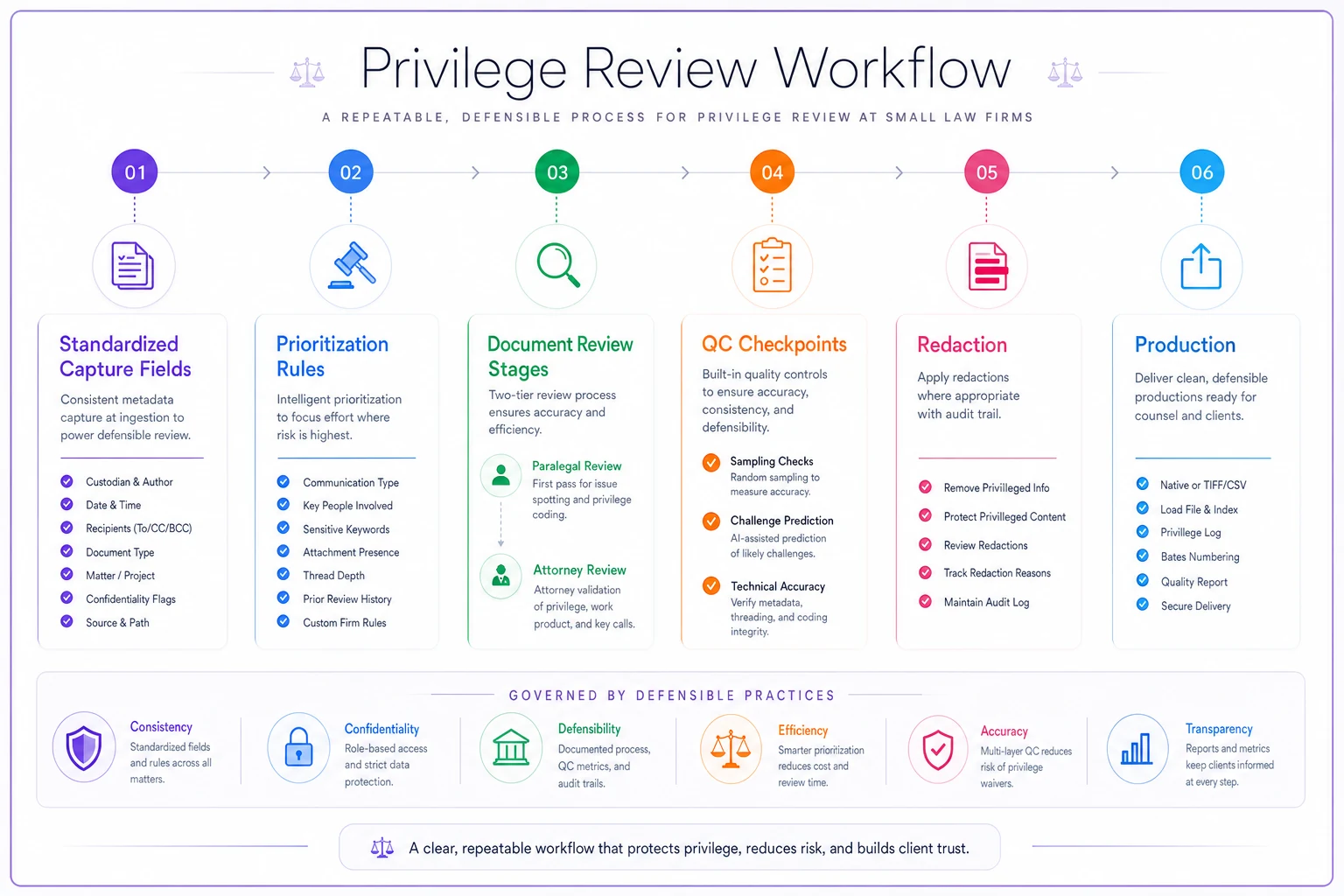
Use this workflow as a baseline and adapt to your firm's needs.
Small firm tooling that streamlines without breaking budgets
Most small firms can't justify enterprise e-discovery platforms charging tens of thousands annually. But trying to manage complex privilege logs entirely in Excel creates expensive problems. The sweet spot involves affordable tools configured for your specific workflow.
Document review platforms
For firms handling thousands to tens of thousands of documents per case, cloud-based review platforms offer the best balance of functionality and cost:
| Platform | Cost | Key Features |
|---|---|---|
| Logikcull | $250-$500/month | Built-in privilege detection, automatic email threading, bulk tagging, direct privilege log export |
| Everlaw | Usage-based | AI-assisted privilege detection, collaborative review, integrated redaction, native log generation |
| DISCO | Per GB | Predictive coding for privilege, real-time QC metrics, automatic privilege propagation, customizable templates |
For truly small productions (under 5,000 documents), even Adobe Acrobat DC with systematic folder organization beats pure manual review. You need searchable PDFs and consistent naming conventions.
Privilege log management
Relativity Review works well if you have access through a vendor. It offers custom privilege log views, automated field validation, version control for log updates, and integration with review decisions.
Excel with structured templates remains viable for many small firms. Use dropdown menus for controlled values, conditional formatting for missing fields, pivot tables for QC reporting, and macros for format standardization.
Google Sheets with add-ons provides multi-user collaboration, real-time validation rules, form-based entry for consistency, and automated backup and versioning.
The worst approach is letting each reviewer maintain their own list and trying to combine them later. Choose one central system and enforce its use from day one.
Redaction workflow tools
Redaction creates another layer of complexity, especially when dealing with partially privileged documents.
Adobe Acrobat Pro DC handles basic redaction needs with search and redact patterns, redaction codes for logging, batch processing capabilities, and certification for court filing.
PDFtron offers more advanced capabilities including automated privilege detection, bulk redaction across document sets, redaction verification tools, and integration with review platforms.
Small firms often waste hours because they start redacting without establishing codes and conventions. Define your redaction codes upfront (e.g., "AC" for attorney-client, "WP" for work product) and use them consistently across all documents.
Define redaction codes upfront (for example, 'AC' for attorney-client and 'WP' for work product) and document those codes in your reviewer checklist.
Small firms often waste hours because they start redacting without establishing codes and conventions. Define your redaction codes upfront (e.g., "AC" for attorney-client, "WP" for work product) and use them consistently across all documents.
Common privilege workflow mistakes that create expensive problems
Treating privilege as binary instead of nuanced
Documents aren't just "privileged" or "not privileged." They might be partially privileged, subject to waiver, or protected only in certain contexts. Reviewers need clear guidance on handling edge cases. Otherwise you get inconsistent determinations that undermine your entire log.
Logging after review instead of during
Some firms have reviewers flag privileged documents, then create the log later as a separate step. This doubles the work and loses critical context. The reviewer who makes the determination should capture the required information immediately while the reasoning is fresh.
Ignoring privilege chains and families
Email threads create special challenges. If one email in a chain is privileged, how do you handle the rest? What about attachments? Without clear rules, reviewers make different decisions on related documents, creating inconsistencies opposing counsel will exploit.
Over-describing in privilege logs
Subject matter descriptions that reveal too much about document content can waive privilege. Reviewers trying to be thorough accidentally provide roadmaps to privileged information. Train them to write descriptions that explain the privilege basis without revealing substance.
Under-investing in QC until challenged
Quality control feels like overhead until you're responding to a motion to compel. Then you're paying senior associates premium rates to review work that should have been verified by paralegals. Front-load the QC investment.
When to bring in specialized help vs. building internal capacity
Small firms face a strategic decision: develop internal privilege review capacity or outsource to specialists.
Build internal capacity when you handle multiple complex litigation matters annually, privilege issues are central to your practice area, you have paralegals interested in specialization, or matters involve recurring clients with similar documents.
Building capacity means investing roughly $15,000-20,000 upfront in training, tools, and process development. But you'll save substantial amounts annually on matters that would otherwise require contract reviewers or outside counsel assistance.
Outsource when you get occasional large productions, privilege issues are rare in your practice, you lack dedicated litigation support staff, or matters involve unfamiliar industries or regulations.
Contract review attorneys with privilege expertise typically cost $75-150/hour. More expensive than internal paralegals but cheaper than having associates learn through trial and error. Document review companies offer managed review starting around $50/document for basic privilege logging.
Hybrid approach for growth
Many successful small firms start with outsourcing, then gradually build internal capacity. Bring in contract reviewers for your next large production, but have internal staff shadow them. Document their processes. Adapt their methods to your needs. Within 2-3 matters, you've developed enough expertise to handle standard privilege reviews internally while still outsourcing complex situations.
Making privilege workflow improvements stick
The best privilege log workflow means nothing if people don't follow it consistently.
Start with a single matter as your pilot. Choose something moderate in size—maybe 2,000-3,000 documents. Big enough to test the workflow but not so large that problems become disasters. Document everything during this pilot: time spent, problems encountered, workarounds developed.
Gather specific feedback afterward. Not "how did it go?" but targeted questions: Which required fields were hardest to complete? Where did the prioritization rules break down? What QC checks caught real problems? This feedback shapes your refined process.
Training needs to be hands-on, not theoretical. Take 50 real documents from a closed matter. Have everyone review them using the new workflow. Compare results. Discuss discrepancies. This surfaces misunderstandings before they affect client work.
Create simple reference materials people will actually use. Not a 20-page manual, but a one-page checklist for reviewers, a decision tree for privilege calls, a quick reference for required fields.
Track metrics that matter for continuous improvement:
-
Average review time per document
-
Percentage requiring QC corrections
-
Number of privilege challenges received
-
Hours spent responding to challenges
These numbers tell you whether your workflow actually reduces reviewer time or just moves work around.
The real test comes three months later. Are people still following the workflow? Have review times decreased? Are privilege challenges less frequent or easier to defend? If not, identify the breakdown points and adjust.
When people see the workflow protecting firm reputation and improving realization rates, compliance becomes automatic.
Moving from reactive scrambles to predictable privilege operations
The difference between firms that handle privilege efficiently and those that don't usually isn't about resources or technology. It's about having a clear, documented workflow that everyone follows consistently.
You know you've succeeded when privilege review becomes predictable. Junior staff can estimate review time accurately. Partners trust the process enough to stop re-reviewing everything. Opposing counsel's privilege challenges decrease because your logs are complete and consistent. The midnight scrambles to fix privilege problems before production deadlines become rare exceptions.
Start with one component. Maybe it's standardizing your required fields. Or establishing QC checkpoints. Or implementing prioritization rules. Pick the area causing you the most pain right now and fix that first. Build momentum with small wins before tackling the entire workflow.
The firms that master privilege workflow aren't necessarily the ones with the biggest budgets or most sophisticated technology. They're the ones that recognized privilege review as an operational challenge requiring an operational solution. They stopped treating each production as a unique crisis and started applying consistent processes that improve with repetition.
Your next complex litigation matter is coming. Whether it consumes excessive review time or runs efficiently depends on the decisions you make about workflow today.
Ready to elevate your legal practice management?
Join 500+ law firms using Casioly to optimize case workflows, reduce administrative burden, and improve client satisfaction.