


Most failed rollouts of law practice management software don't actually fail at go-live. They fall apart somewhere around month four, when the early enthusiasm is gone, the data migration turns out messier than anyone expected, and two partners quietly go back to their spreadsheets because "the new system doesn't have their matters set up right." By the time leadership catches on, you've got a system of record nobody fully trusts.
It's almost never the software's fault. Products in this category have converged — intake, matters, time, billing, trust accounting, document management, reporting. What separates a clean adoption from expensive shelfware is the twelve months of sequencing, communication, and accountability wrapped around the tool. That's what this playbook covers: a month-by-month structure you can actually run, written for a firm somewhere between 8 and 80 timekeepers that doesn't have a dedicated transformation office.
This isn't a feature checklist. If you're still picking a product, that work belongs earlier. This picks up the day you sign.
How to Read This Roadmap
The twelve months break into four phases, and the mistake firms keep making is compressing the first two to rush the last two. Resist that.
| Phase | Months | Primary Goal | What "done" looks like |
|---|---|---|---|
| Foundation | 1–3 | Governance, data model, migration scope | Agreed matter schema, migration map signed off |
| Build & Migrate | 4–6 | Configuration, first data load, integrations | Core data in staging, config matches real workflows |
| Parallel Run | 7–9 | Run old + new simultaneously, train | Clean reconciliation between systems for 60 days |
| Cutover & Steady State | 10–12 | Switch system of record, retire old, measure | Old system read-only, adoption KPIs green |
A reasonable rule: if a phase isn't genuinely finished, don't start the next one on schedule. Slipping a month on migration is cheap. Going live on bad data is not.
Months 1–3: Foundation (the Part Everyone Underfunds)
Stand Up Governance Before You Touch Configuration
Never miss a critical deadline again.
Casioly helps legal teams manage cases efficiently and stay on top of critical tasks.
- Centralized case tracking
- Automated deadline reminders
- Secure client communication
No credit card required
The first real decision isn't technical. It's who gets to decide things. Firms that skip this end up with a managing partner overriding config choices in month six, which unravels weeks of work.
-
Executive sponsor (usually a managing or ops partner) — accountable for the whole program, signs off at phase gates, unblocks political issues.
-
Project lead (often the firm administrator or legal-ops lead) — responsible for day-to-day execution and the schedule.
-
Data owner — accountable for migration quality and the matter schema.
-
Practice-group leads — consulted on workflow decisions for their groups.
-
IT / vendor liaison — responsible for integrations and technical setup.
-
Everyone else — informed, on a predictable cadence.
The single most useful thing you can do here is get the executive sponsor to commit to the phase-gate reviews in writing. A one-page sign-off per phase forces a real conversation at each transition instead of quiet drift.
Lock the Matter Data Model Early
This is where quiet disasters start. Firms load whatever fields the old system had, map them loosely, and discover at parallel-run that two practice groups mean completely different things by "matter status." You can't reconcile what you never defined.
Decide before any migration what your canonical fields are, which are required, and who owns enforcement. The detailed version of this work — field lists, migration mapping, enforcement checkpoints — is worth doing properly against a reference like the Canonical Matter Metadata Model rather than inventing it under deadline pressure. A clean schema in month two saves weeks of cleanup in month eight.
Prioritize Migration Scope — Don't Boil the Ocean
Nobody successfully migrates fifteen years of data cleanly in one pass. Firms that try spend their whole budget on dead matters from 2011.
Tier your scope:
-
Tier 1 — Active matters. Open matters with current activity. Full field set, clean, validated. Non-negotiable.
-
Tier 2 — Recently closed (last 18–24 months). Needed for conflicts, collections, and references. Migrate core fields; relax completeness on older cosmetic data.
-
Tier 3 — Archive. Everything else. Decide deliberately
migrate as read-only summary records, or leave in the old system as an archive accessible for a defined retention window.
A mid-size firm might have 400 active matters, 1,200 recently closed, and 9,000 archived. Treating those three tiers identically is how a six-month plan becomes a fourteen-month one.
Month 3 Gate
Before leaving Foundation, you should have: signed RACI, agreed matter schema, tiered migration scope with record counts, a draft communications plan, and an executive sign-off on the phase. If any of those is "mostly done," you're not done.
Months 4–6: Build and Migrate
Configure to Real Workflows, Not the Demo
Vendors configure to the happy path they showed you in the sales cycle. Your actual intake has three exceptions, your trust handling has a quirk your bookkeeper insists on, and you've got a client who requires a custom billing format. Configuration has to reflect how matters really move.
This is the point to document your actual stage flow and the automation you want on top of it. Be conservative. Over-automating in month five, before anyone trusts the data, creates errors that are hard to trace. The patterns worth building — and the guardrails that keep automation safe — are covered well in these matter orchestration patterns and safe automation rules. Start with automations that are reversible and obvious; add the clever ones after cutover.
Modern platforms include AI-assisted features at this stage — suggested time entries, document classification, intake routing. These genuinely reduce manual work, but treat them the same way you'd treat a new associate: useful, worth adopting, and not trusted unsupervised until they've proven accurate on your data. Turn them on in limited scope during build, watch the outputs, then widen.
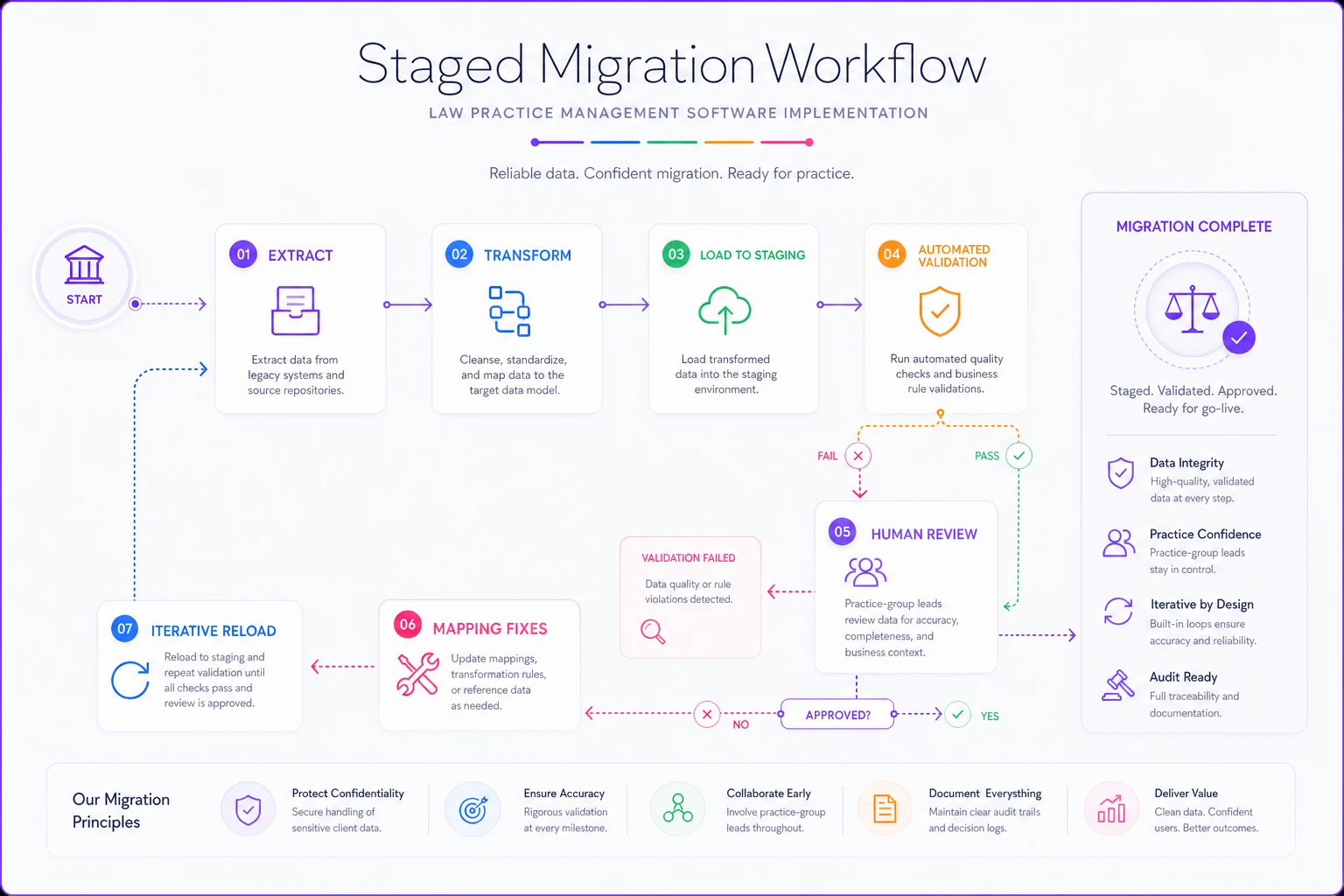
Run the First Migration into Staging
The first load always goes to a staging environment, never production. The goal isn't perfection — it's exposing the mapping problems you missed. Expect it to be ugly.
-
Extract Tier 1 from the old system.
-
Transform against the agreed schema.
-
Load to staging.
-
Run validation reports — record counts, required-field completeness, orphaned records, duplicate clients.
-
Hand a sample to the data owner and two practice-group leads to eyeball real matters they know.
-
Log every discrepancy, fix the mapping, reload.
That sixth step is where firms cut corners. Automated validation catches structural problems; only a human who knows the matter catches "this says the Henderson case closed but it's still active."
Here's a quick visual of the migration workflow.
Stand Up Integrations Deliberately
Accounting, document management, email, e-signature, court-rules calendaring — each integration is a place where data can quietly drift after go-live. Decide ownership and reconciliation rules now, not after the first mismatch. Integrations governance deserves its own documented ownership matrix so that when the trust ledger and the accounting system disagree in month nine, there's already a named owner and a defined reconciliation cadence.
Month 6 Gate
Tier 1 and Tier 2 in staging, validated and signed off by the data owner and practice leads. Core integrations tested in staging. Configuration reviewed by each practice group. Training plan finalized. Executive sign-off.
Months 7–9: Parallel Run
Why Parallel Run Is Worth the Pain
Parallel run — keeping the old system live while the new one runs alongside — is annoying, duplicative, and the single best insurance against a bad cutover. For a defined window, critical transactions happen in both systems and get reconciled.
You don't parallel-run everything. You parallel-run the things that hurt most when they break: time capture, billing, and trust accounting. If those reconcile cleanly for 60 days, you can cut over with confidence. If they don't, you've found the problem while you still have a safety net.
Training That Matches How People Actually Work
Generic vendor training fails because it's organized around the software's menu, not around someone's actual day. A litigation paralegal and a collections clerk need different first lessons.
-
Role-based sessions — intake staff, timekeepers, billing, trust/bookkeeping, partners. Short, scenario-driven, using your real configured workflows.
-
Just-in-time reference — one-page cheat sheets for the five things each role does daily.
-
Office hours — a standing weekly slot for the first eight weeks where anyone can bring a real matter and get unstuck.
A training calendar that works for a 40-person firm: week 1, administrators and super-users; weeks 2–3, role-based cohorts (two sessions each, max ten people); week 4, partner-focused sessions on reporting and dashboards; weeks 5–8, weekly office hours plus targeted refreshers based on where adoption data shows people struggling.
That last part matters — you train based on what the metrics tell you, not on a fixed script.
Measure Adoption, Not Just Activity
Logins are a vanity metric. Someone can log in every day and still keep their real matter list in Excel. Track behaviors that mean the system is becoming the actual source of truth:
-
% of active matters with complete required fields (target
climbing toward 95%+)
-
% of time entries captured in-system within 48 hours (early target 70%, steady-state 90%+)
-
% of bills generated from the new system (should approach 100% before cutover)
-
Parallel-run reconciliation variance (trust and billing should trend to near-zero)
-
Support tickets per user per week (should decline after week four; if it doesn't, your config or training has a gap)
Watch for the partner who shows 100% login and 20% field completeness. That's the pattern that predicts a quiet revolt. Address it person-to-person, early.
Common Risks in This Window — and What to Do
| Risk | How it shows up | Mitigation |
|---|---|---|
| Dual-entry fatigue | Staff stop updating the old system | Set a firm parallel-run end date; communicate it weekly |
| Reconciliation never converges | Trust/billing variance stays high | Freeze config changes; dedicate the data owner to root-cause before extending the window |
| Senior holdouts | A partner refuses to move | Executive sponsor handles directly; don't let the project lead absorb it |
| Scope creep | New feature requests mid-run | Log them for post-cutover; protect the schedule |
| Integration drift | Numbers disagree across systems | Trigger the reconciliation owner and cadence you defined in month 6 |
Month 9 Gate
60 days of clean reconciliation on time, billing, and trust. Adoption KPIs trending to target. All roles trained with office hours running. A written go/no-go recommendation to the executive sponsor.
This is the real decision point — and it's fine to extend parallel run two to four weeks if reconciliation isn't clean. Going live on uncertain trust data is the one mistake you genuinely can't walk back.
Months 10–12: Cutover and Steady State
The Go-Live Checklist
-
- [ ] Final incremental migration of any records changed during parallel run
-
- [ ] Final reconciliation signed off by data owner and bookkeeper
-
- [ ] Old system switched to read-only (not deleted — read-only)
-
- [ ] Integrations pointed at production and re-tested
-
- [ ] Required-field enforcement turned on in production
-
- [ ] Super-users on-call for the first full week
-
- [ ] Communication sent firm-wide
effective date, who to call, where the cheat sheets live
-
- [ ] Executive sign-off on go-live recorded
Keep the old system read-only for your defined retention window. Deleting it the week after cutover is how you discover the one report nobody migrated.
Steady State Is a Phase, Not an Event
The first 60 days after cutover decide whether adoption holds. Keep office hours running at reduced frequency. Keep watching the adoption KPIs — field completeness and timely time capture are the two that slip first when attention moves on.
This is also when the governance you built in month one earns its keep. New matter types, new automation requests, and integration changes now flow through a defined owner instead of happening ad hoc. The risk scoring and audit discipline from a structure like the Matter-Risk Control Matrix gives you a steady cadence for checking that the controls you configured are actually being followed, rather than finding out during an audit that enforcement quietly lapsed.
A Realistic Scenario
A 22-attorney litigation and real estate firm signed with a cloud LPM product after a long selection process. Their first instinct was to go live in four months — the vendor said it was doable.
Instead they ran the full twelve. Foundation took the entire first quarter, mostly because defining matter status consistently across litigation and real estate surfaced disagreements nobody knew existed. Migration tiering cut their load from roughly 11,000 matters down to about 380 active and 1,100 recent, with the archive left read-only in the old system. Parallel run exposed a trust reconciliation variance that would have been a compliance problem had they gone live early; it took three weeks to trace back to a mapping error.
By month twelve, around 90% of time entries were captured in-system within two days, compared to a laggy, inconsistent process before. Billing moved almost entirely to the new platform. The two partner holdouts — always the real risk — came around once the dashboards gave them realization data they'd never had cleanly before. Was it slower than the four-month plan? Yes. Did it stick? Also yes, which is the only outcome that actually matters.
When a 12-Month Timeline Is the Wrong Call
When it makes sense: most firms between roughly 10 and 80 timekeepers with real trust accounting, multiple practice groups, and years of legacy data. The complexity is exactly what the sequencing is built for.
When it's overkill: a solo or three-person firm with a hundred active matters and clean data can reasonably compress this to three or four months. The phases still apply — you just spend days where a bigger firm spends weeks. Don't skip parallel run on trust accounting, though, regardless of size.
Who should slow down even further: firms mid-merger, firms with known data-quality problems in the source system, or firms where no one will own the schema. If you can't name a data owner, fix that before you start the clock. A rollout with no accountable data owner doesn't fail dramatically — it just never quite becomes the system of record, and you end up paying for software everyone quietly works around.
The One Thing to Take Away
The software is the easy part.
The twelve months of governance, honest migration scoping, patient parallel run, and role-based training are what turn a purchase into something people actually trust. Firms that treat implementation as a project with phase gates and named owners get adoption. Firms that treat it as an install get shelfware with a monthly invoice. Pick the slower path on purpose — it's the faster one in the end.
Pick the slower path on purpose — it's the faster one in the end.
Ready to elevate your legal practice management?
Join 500+ law firms using Casioly to optimize case workflows, reduce administrative burden, and improve client satisfaction.