


Most firms buy a case management system, flip on the automated calendaring module, and assume the deadline math is right because the vendor demo showed it working. Then eighteen months later a paralegal notices the system computed a federal response deadline using calendar days instead of business days — and nobody caught it because the reminder fired on time. It just fired for the wrong date.
That's the trap. Automated reminders feel reliable because they're punctual. Punctual and correct are different things. A system that confidently emails you about the wrong date is more dangerous than no system at all — it manufactures false confidence.
This checklist covers the second layer: the technical features and firm policies you should demand from a case management deadline setup so the automation is actually trustworthy, not just on time. It assumes you already have calendaring ownership rules in place. If you don't, start with calendaring governance, dual-owner rules and escalation templates first, then come back here for the system-level requirements.
Start with rule-engine semantics, because this is where silent errors live
Everything downstream depends on how the rule engine interprets a trigger date. Most procurement checklists skip this entirely — they ask "does it calculate deadlines?" instead of "how does it calculate deadlines, and can I see the logic?"
-
Day-counting basis. Can a single rule specify calendar days vs. court days vs. business days? Does the engine let you mix them in a chain — say, 30 calendar days to respond, but if that lands on a court holiday, roll forward to the next court day?
-
Holiday and court-closure calendars. Are jurisdiction-specific holiday tables maintained by the vendor, by you, or both? When a court announces an unplanned closure, how fast does that propagate, and who approves the change?
-
Trigger-event definitions. Is "service date" the date of mailing, receipt, or filing? The engine should force you to pick explicitly rather than defaulting silently.
-
Rounding and midnight behavior. If a deadline is "within 21 days," does day zero count? Does the engine treat the cutoff as end-of-day in the court's timezone or the firm's?
-
Dependent deadline cascades. When a trigger date changes, do all downstream deadlines recalculate automatically — and does the system show you a diff of what moved before committing?
The most expensive errors aren't wrong formulas. They're ambiguous formulas — ones that produce correct results in common cases and wrong results in edge cases. A rule that counts calendar days looks fine for months until the first deadline lands across a three-day weekend abutting a court holiday.
Require the engine to be inspectable. You should be able to click any computed date and see the full derivation: trigger event, rule applied, days counted, holidays skipped, timezone used. If the vendor can't show you the "work," you're trusting a black box with malpractice exposure.
Testing and deployment controls: rules are code, treat them like code
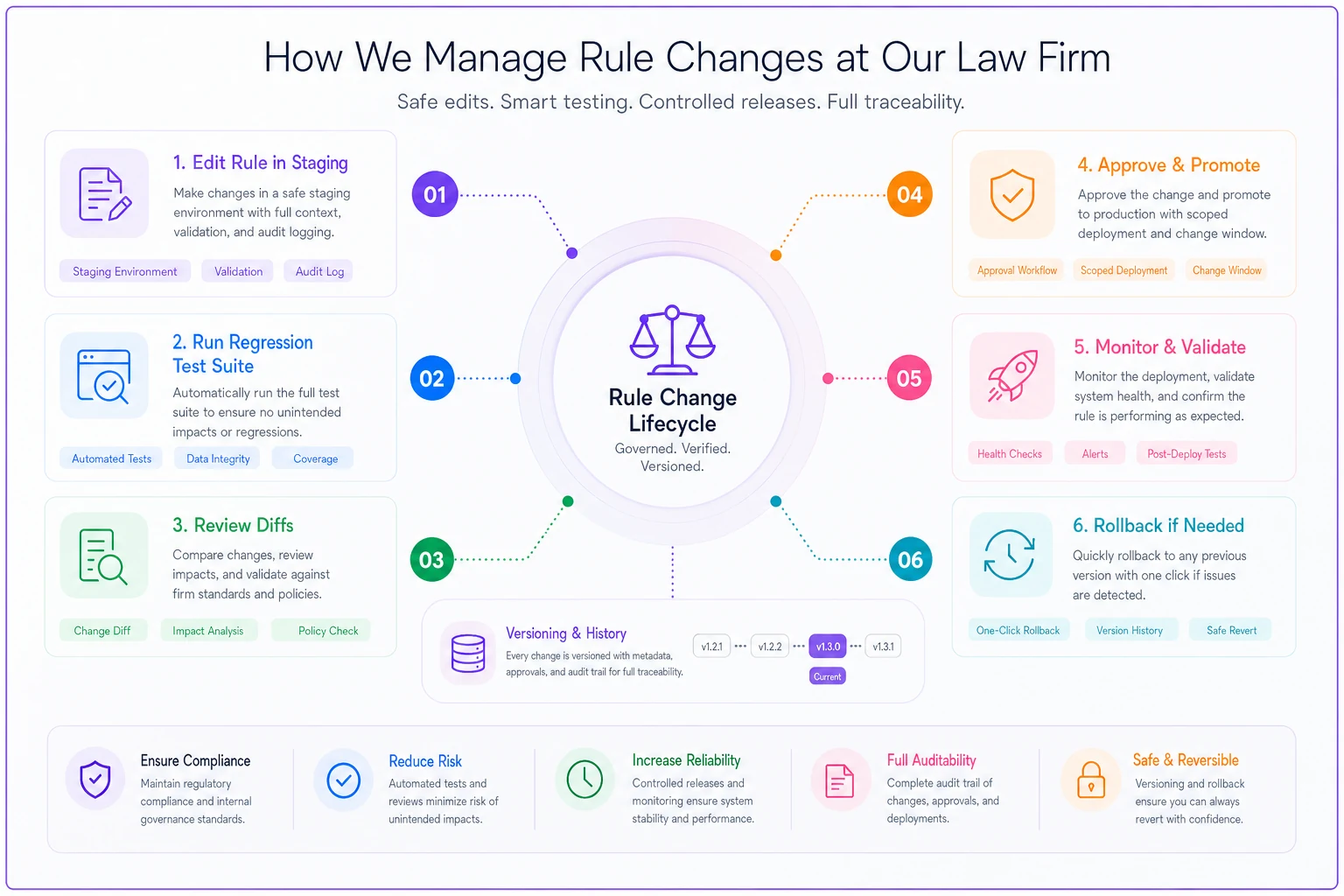
Firms rarely ask about this: when the vendor updates a jurisdiction rule set, or when your own staff edits a custom rule, what testing happens before that change goes live?
Never miss a critical deadline again.
Casioly helps legal teams manage cases efficiently and stay on top of critical tasks.
- Centralized case tracking
- Automated deadline reminders
- Secure client communication
No credit card required
-
A sandbox or staging environment where rule changes can be tested against sample matters before promotion to production.
-
Regression test suites — a fixed set of known matters with known-correct deadlines that re-run automatically after any rule change. If the suite breaks, the deployment blocks.
-
Change versioning on rules themselves, so you can see which version computed a given deadline and roll back cleanly.
-
Scoped deployment — the ability to apply a rule update to new matters only, or to specific jurisdictions, rather than retroactively recomputing everything.
Sample acceptance tests to put in your contract or evaluation
| Test | Input | Expected behavior |
|---|---|---|
| Weekend roll | Deadline lands on Saturday | Rolls to next court day, shows the roll in derivation |
| Holiday abutment | Deadline on Friday before a Monday court holiday | Correctly identifies whether to roll and by how much |
| Trigger-date change | Edit service date by 3 days on an active matter | All dependent deadlines recalc; system shows a diff before commit |
| Timezone edge | Deadline "end of day" for a court two timezones away | Reminder and computed cutoff use court timezone |
| Rule rollback | Deploy a bad rule, then roll back | Affected matters restore to prior correct dates with audit trail |
| Day-zero counting | "Within 14 days" from a Monday trigger | Matches the jurisdiction's day-zero convention exactly |
If a vendor fails the rule-rollback or diff-before-commit tests, that's not a minor gap. That's the difference between a controllable system and one that can quietly corrupt your calendar. Treat those two tests as disqualifying.
Immutable audit trails: the part you'll wish you had during a malpractice claim
When a deadline gets missed and questions start getting asked, the most valuable thing you can produce is a complete, tamper-evident record of what the system knew, when, and who touched it.
-
Timestamp (with timezone)
-
Actor (user or system process)
-
The before and after state of whatever changed
-
The rule version in effect at the time
-
The computed derivation for any deadline it produced
A real failure mode worth naming: a firm had audit logging, but it was editable by administrators. During a dispute, opposing counsel pointed out that any record the firm produced could have been altered after the fact — which made the entire log worthless as evidence. The firm had no real defense, not because the log was wrong, but because it wasn't trustworthy.
Also confirm retention duration. Deadline-related audit records should survive matter closure and outlive your malpractice exposure window in your jurisdiction. If the system purges logs on matter close, that's a serious gap.
API and integration specs: where deadlines go to die quietly
Deadlines rarely live in one system. The trigger event often originates in e-filing or court-notification feeds, and reminders go out through separate email or SMS infrastructure. Every handoff is a place where a date can get dropped or mangled.
-
Idempotent writes. If the court feed sends the same filing notice twice, the system should recognize it and not create duplicate trigger events or duplicate recalculations.
-
Field-level mapping documentation. Exactly which incoming field becomes the trigger date, and what happens if it's null or malformed.
-
Failure handling. When an integration drops or a webhook fails, does the system alert someone, or does the deadline just never get created? Silent integration failures are among the most dangerous — a deadline that was never calculated produces no reminder and no error.
-
Reconciliation hooks. The ability to periodically compare deadlines in your case management system against the source of truth (court docket, for instance) and flag mismatches.
Integrations tend to work flawlessly in the demo and degrade quietly in production as data formats drift. A date field that was always populated starts arriving empty after a court system update, and deadlines for those matters simply stop being created. Nobody notices until something's already blown.
Multi-channel reminder rules: more channels, more ways to assume "someone got it"
Email, SMS, and in-app reminders each fail differently. Email lands in spam. SMS doesn't deliver to a changed number. In-app only works if someone logs in. The mistake is treating any single channel as sufficient and assuming delivery equals receipt.
-
Escalating channels, not simultaneous spam. First reminder in-app and email; as the deadline approaches and if unacknowledged, add SMS and route to a second person.
-
Delivery confirmation vs. acknowledgment. These are different. "Email sent" is not "human saw it." Require explicit acknowledgment for critical deadlines — a click, a check-off — and treat an unacknowledged reminder as an open escalation.
-
Channel fallback on failure. If SMS bounces, the system should automatically try another channel and log the bounce, not silently give up.
-
Quiet-hours and timezone handling so a 2 a.m. SMS doesn't train people to ignore alerts.
Require an explicit acknowledgment (a click or documented action) before marking high-consequence deadlines as handled so escalations trigger reliably.
Reminder fatigue is itself a compliance risk. If every matter generates ten low-priority pings, people learn to dismiss them — and the one critical reminder gets dismissed along with the noise. Tier your reminders by consequence severity, not by convenience.
Security, compliance, and RBAC: who can change a deadline rule matters as much as the rule
Deadline logic is sensitive infrastructure. If any user can edit a rule or override a computed date without a trace, you don't have controls — you have suggestions.
Separation of duties to enforce
-
The person who edits rules should not be the only person who approves rule changes into production.
-
The person who overrides a computed deadline on a matter should trigger a notification to a supervising attorney — overrides are exactly where human error re-enters an automated system.
-
Admin access to audit logs should be read-only; the ability to alter logs should not exist for anyone.
Baseline security requirements
-
Encryption at rest and in transit (table stakes, but confirm it).
-
Role-based access scoped so paralegals can view and acknowledge but not edit rule semantics without approval.
-
SSO with enforced MFA for anyone with rule-editing or override privileges.
-
Vendor compliance attestations (SOC 2 Type II at minimum) covering the systems that store deadline and audit data.
-
- [ ] Rule editing and rule approval are different roles
-
- [ ] Deadline overrides are logged and notify a supervisor
-
- [ ] Audit logs are read-only for all users, including admins
-
- [ ] Override privileges are restricted to named roles, reviewed quarterly
-
- [ ] Departed-employee access is revoked within 24 hours and verified against the audit trail
A quick checklist for separation of duties:
Escalation and evidence verification: closing the loop
An automated reminder's job isn't done when it sends — it's done when someone verifiably acts on it, or an escalation catches the gap. The missing piece in most setups is evidence that the required action actually happened.
A reminder fires for a response deadline. The attorney marks it "done." But done according to what? Require the system to let you attach or reference evidence of completion — a filing confirmation number, a document ID, a timestamped upload — before a critical deadline can be marked closed. "Done" without evidence is just a checkbox, and checkboxes lie.
A recommended escalation schedule
| Time before deadline | Action | Recipient |
|---|---|---|
| 14 days | First reminder (in-app + email) | Responsible attorney + paralegal |
| 7 days | Second reminder if unacknowledged | Same + cc supervising attorney |
| 3 days | Escalation + SMS; requires acknowledgment | Responsible attorney; supervisor notified |
| 1 day | Hard escalation if no evidence of completion | Supervising attorney + practice group lead |
| Deadline day, no evidence | Block/flag + mandatory sign-off | Managing partner or designated backstop |
The key design choice: escalation is driven by acknowledgment and evidence, not just by the clock. A reminder that goes unacknowledged should escalate automatically. A deadline marked done without evidence should still flag. The clock alone isn't enough, because the whole point is catching the matter that fell through.
A real scenario
A six-attorney litigation boutique handling around 180–200 active matters had automated calendaring running for about two years. Their day-counting rules were mostly correct, but they had no diff-before-commit on trigger-date changes and no evidence requirement on completion.
What bit them: a paralegal updated a service date on a matter, which should have pushed three dependent deadlines. The system recalculated — but one dependent rule had been custom-built with a hardcoded date instead of a relative offset, so it didn't move. No diff was shown, so nobody saw the stale date. The reminder fired on the old (now wrong) date, the attorney acknowledged it, and the actual deadline passed uncaught.
They caught it with eleven days to spare only because a second attorney happened to cross-check the docket. Close call, not a disaster — but it exposed the gap clearly.
The fixes afterward were unglamorous and effective: diff-before-commit on any trigger-date change, a quarterly reconciliation comparing system deadlines against the court docket, and an evidence-attachment requirement before any critical deadline could be marked closed. Over the following year they caught two more stale-date situations through the diff screen alone — both would have been invisible under the old setup.
When heavy controls make sense — and when they're overkill
Require the full stack — immutable logs, sandbox testing, evidence verification, separation of duties — if you do litigation, appellate work, or anything with hard statutory deadlines where a miss is a malpractice event. The cost of the controls is trivial against a single blown statute of limitations.
Scale it down for transactional or advisory practices where most "deadlines" are soft internal targets. You still want audit trails and multi-channel reminders, but the elaborate escalation schedule and evidence-of-completion gating may be more process than the risk warrants.
Who should not rely on automation alone: any firm that can't answer "show me how the system computed this date." If the derivation isn't inspectable, automation isn't reducing your risk — it's concentrating it into a system nobody fully understands. In that situation, a dual-owner manual process is genuinely safer than a black box.
The practical takeaway
Automated deadline systems don't typically fail because they miss reminders. They fail because they send confident, punctual reminders for dates that were computed wrong, changed silently, or never created at all — and the confidence masks the error until it's too late.
Good case management deadline controls close those gaps specifically: inspectable rule logic so you can verify the math, tested deployment so rule changes can't silently corrupt live matters, immutable audit trails so you can prove what happened, evidence verification so "done" actually means done, and escalation driven by acknowledgment rather than just the clock.
Use the acceptance tests and escalation schedule above as a concrete evaluation checklist before trusting any system with a deadline that could end a matter. The tool should have to earn that trust by showing its work — not just by being on time.
Ready to elevate your legal practice management?
Join 500+ law firms using Casioly to optimize case workflows, reduce administrative burden, and improve client satisfaction.