


The email comes in at 4:17 PM on a Thursday. Opposing counsel wants documents from six custodians, going back three years. Your paralegal starts pulling files while the associate frantically searches for that preservation notice template someone used last year. Nobody remembers which version was the final one. By Monday morning, you've collected 40,000 documents from the wrong date range because the custodian list had an old employee who left eighteen months ago.
This happens constantly in small law firms handling ediscovery intake. Without dedicated e-discovery teams or fancy software, firms treat each discovery request like a brand new emergency. The result? Wasted time, missed deadlines, and sometimes sanctions.
The pattern becomes clear after watching dozens of small firms navigate discovery without proper systems: they need lightweight processes that actually get followed, not complex frameworks that require dedicated staff to maintain.
The Custodian List Problem Nobody Talks About
Most small firms think a custodian list means typing names into a Word document. Then discovery hits and you realize Sarah Johnson from accounting is now Sarah Mitchell after getting married, the IT contractor from 2021 never had a company email address, and three board members use personal Gmail accounts for everything.
-
Current contact information - Not just names, but active email addresses, phone numbers, and physical locations. When preservation notices go out, bounced emails cost you days.
-
Data source mapping - Where each custodian's information actually lives. John might use Outlook for email but Teams for all project communication. Missing either creates gaps.
-
Date ranges of involvement - When custodians joined projects, left the company, or changed roles. This prevents collecting three years of irrelevant data from someone who worked on a matter for two months.
-
Access credentials - Who can actually get into these accounts? If your IT person quits tomorrow, can you still access archived emails?
-
Preservation status tracking - Did they acknowledge the hold notice? Are they actually preserving data or did they misunderstand the instructions?
Small firms often discover these gaps mid-production when opposing counsel points out missing custodians or date ranges that don't align with deposition testimony.
Building Preservation Notices That Actually Work
Generic preservation notice templates fail because they assume every matter follows the same pattern. A breach of contract case needs different preservation instructions than an employment discrimination claim. Yet most firms use the same boilerplate notice for everything, which leads to over-preservation (expensive) or under-preservation (dangerous).
Never miss a critical deadline again.
Casioly helps legal teams manage cases efficiently and stay on top of critical tasks.
- Centralized case tracking
- Automated deadline reminders
- Secure client communication
No credit card required
The preservation notice needs three sections that adapt to each matter:
First, the scope definition. Instead of "preserve all documents related to the matter," specify exact categories. For an employment case: performance reviews from 2021-2023, all Slack messages with the plaintiff, emails containing specific keywords, and any documents in the personnel file. Vague instructions lead to either massive over-collection or critical gaps.
Second, the technical instructions. Don't assume everyone knows how to preserve text messages or understands that deleting items from Outlook still leaves them in deleted items for 30 days. Include step-by-step instructions for each data type. For mobile devices: screenshot important texts, forward work-related messages to a dedicated email address, or use the firm's approved backup tool.
Third, the acknowledgment mechanism. A simple "I acknowledge" isn't enough. The notice should require custodians to confirm they understand what to preserve, where their data resides, and any issues preventing compliance. One firm discovered three employees had been using personal Dropbox accounts for work files only after adding a checklist requiring disclosure of all data storage locations.
The biggest mistake? Sending preservation notices without a follow-up system. Custodians ignore notices, misunderstand instructions, or forget about holds months later. This is where a lightweight tracking system makes all the difference.
The Tracking Log That Prevents Disasters
Excel might not be sophisticated, but it beats the sticky note system most small firms use for tracking discovery. The key is building a log that captures what matters without becoming a full-time job to maintain.
| Field | Purpose | Common Failure Point |
|---|---|---|
| Request ID | Links to specific discovery request | Firms track by case name, causing confusion with multiple requests |
| Custodian Name | Current legal name and any aliases | Missing maiden names or nicknames used in communications |
| Date Notice Sent | When preservation actually went out | No record of whether notice was actually delivered |
| Acknowledgment Date | When custodian confirmed receipt | No follow-up on missing acknowledgments |
| Collection Status | Not started/In Progress/Complete/Issues | Binary complete/incomplete misses partial collections |
| Notes/Exceptions | Why certain data wasn't collected | No documentation for defensible decisions |
Better approach: tie log updates to existing workflows.
The tracking log becomes useful only when someone actually owns it. In firms without e-discovery teams, this usually falls to a paralegal juggling eight other responsibilities. The result? Updates happen during panic moments before production deadlines.
When sending preservation notices, update the log immediately. When collecting data, update the log before moving to the next custodian. When issues arise, document them in real-time, not three weeks later when you're trying to explain gaps to opposing counsel.
Prioritization Rules When Everything Seems Urgent
Small firms treat every document request with equal urgency, burning out staff and missing actually critical deadlines. Not every custodian needs immediate attention, and not every data source requires forensic-level collection.
The prioritization framework that actually works starts with legal risk, not data volume. A CFO's emails about financial statements in a fraud case get priority over the receptionist's calendar entries. This seems obvious, but firms regularly spend days collecting low-value data while critical custodians wait.
Next, consider collection complexity. If the former employee's laptop is in storage but the current employee's data is readily accessible, start with what you can collect quickly. Momentum matters more than perfect sequencing. While you're collecting easy data, you can work on accessing the complex sources.
Then factor in opposing counsel's focus areas. If they've deposed three specific employees, prioritize those custodians' data. Discovery disputes often center on a handful of key players, not the entire custodian list.
Finally, use date ranges strategically. Instead of collecting everything then filtering, start with the most relevant time periods. For a contract dispute, the three months around contract signing matter more than the two years after. You can always expand if needed, but starting narrow saves enormous review time.
Small Firm Reality Check: Manual Systems vs. Automation
Manual ediscovery intake in a ten-attorney firm looks like this: The litigation partner emails the preservation notice template to their assistant, who updates it in Word and sends individual emails to eight custodians. Three bounce back because email addresses changed. The assistant tracks responses in a notebook. Two weeks later, IT starts collecting emails by manually exporting from Outlook, one custodian at a time. The process takes 60 hours of combined effort for a relatively simple matter.
The operational burden compounds with each active matter. Five concurrent cases with discovery means five different tracking spreadsheets, multiple versions of preservation notices floating around, and nobody quite sure which custodians have been collected for which matter. Staff spend more time coordinating the process than actually collecting data.
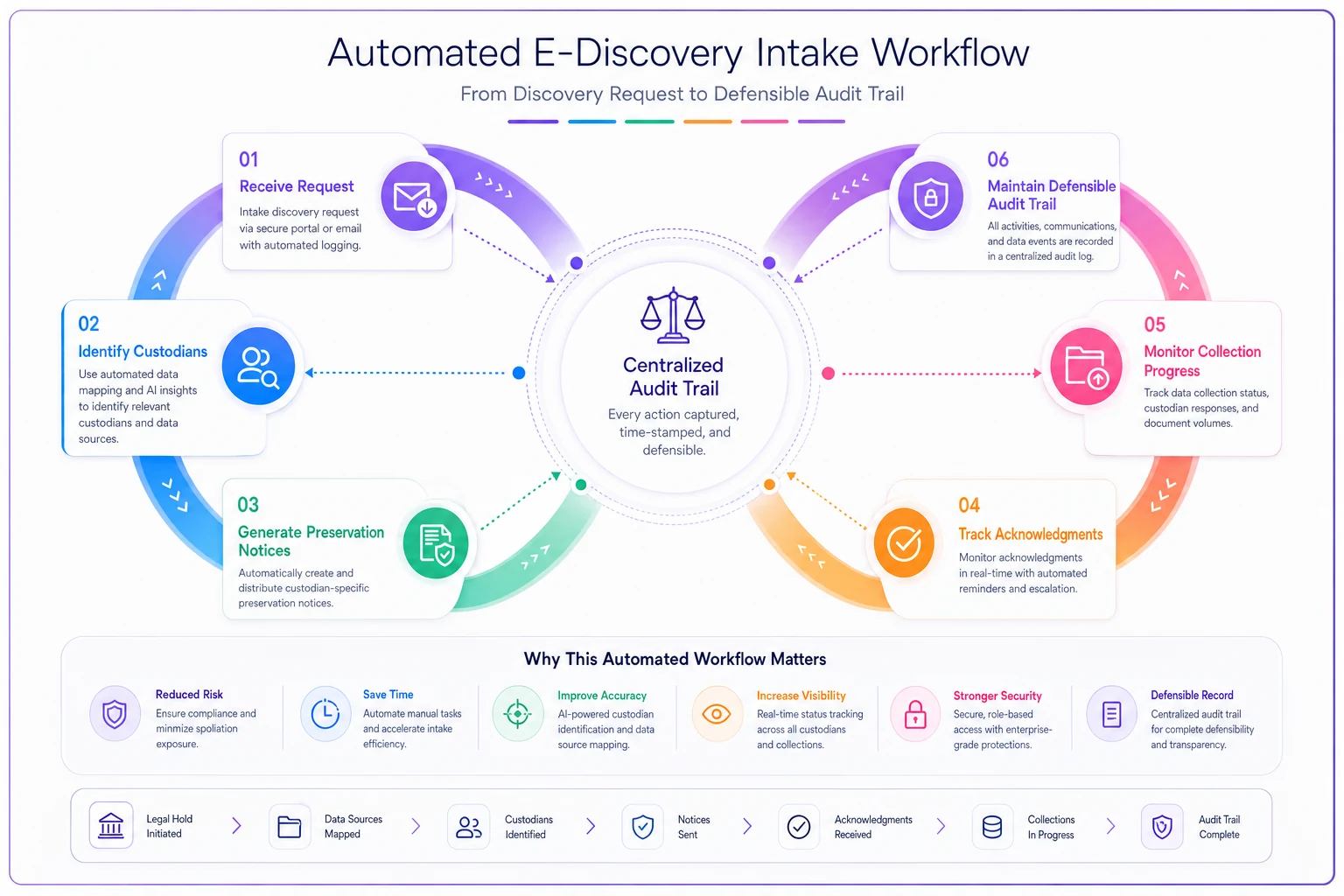
This diagram shows how automation moves the intake process from manual spreadsheets and emails to a single automated workflow that tracks each step.
This is where AI-powered operational software changes the equation for small law firms. Instead of manually tracking custodians across spreadsheets, the system maintains a central custodian database that updates across all matters. Preservation notices get generated from templates but automatically customize based on matter type and custodian role. The platform tracks acknowledgments, sends automatic reminders, and escalates non-responses.
The real value comes from workflow automation. When a new discovery request arrives, the system identifies relevant custodians based on matter involvement, generates appropriate preservation notices, tracks collection status, and maintains a defensible audit trail. What took 60 hours of manual coordination drops to maybe 5-6 hours of actual decision-making.
AI agents handle the repetitive tasks that burn out legal staff: checking for custodian acknowledgments, updating collection status, generating status reports, and flagging exceptions that need human review. The platform doesn't replace legal judgment about what to collect or how to respond to requests. It just eliminates the administrative burden that makes ediscovery intake painful for small firms.
More importantly, this automation creates consistency. Every preservation notice follows the same format. Every custodian gets tracked the same way. Every collection follows the same process. When opposing counsel challenges your discovery responses, you have clean documentation showing exactly what was preserved, when, and by whom.
Common Intake Failures and Their Fixes
The Forgotten Custodian Problem: Two months into discovery, someone mentions the consultant who worked on the project. They never got a preservation notice because they weren't an employee.
Fix: During matter intake, specifically ask about non-employee custodians: contractors, consultants, board members, outside advisors. Add them to your custodian list with clear designation of their status and how to reach them.
The Moving Target Issue: Custodians leave the company, change roles, or get promoted during litigation. Their data access changes but preservation obligations remain.
Fix: Build exit procedures that specifically address legal holds. When someone under a hold leaves, immediately image their devices and accounts before deactivation. Document the preservation steps taken and maintain access credentials for the archived data.
The Personal Device Nightmare: Employees use personal phones for work texts and calls but claim privacy concerns when asked to preserve data.
Fix: Address this upfront in the preservation notice with specific options: forward work-related texts to firm email, use mobile backup software for selective preservation, or provide the device for imaging with personal data excluded. Document their choice and any resulting gaps.
The Scope Creep Spiral: Initial request asks for emails about "Project X." Three months later, you're collecting every document that mentions any client from 2019-2023.
Fix: Document scope discussions in writing after every meet-and-confer. When opposing counsel expands requests verbally, follow up with an email confirming the new scope. Track these changes in your log to explain collection costs and time requirements.
Building Your Lightweight System
The perfect e-discovery system that never gets used is worse than the simple spreadsheet that everyone actually updates. Start with the absolute minimum: a custodian list template, a basic preservation notice, and a simple tracking log.
Once those are working, add complexity gradually. Maybe you add fields for data volumes after a few collections. Perhaps you create matter-specific preservation notice variants after seeing patterns. You might integrate with your case management system once the basic workflow is solid.
The test of any ediscovery intake system for small law firms isn't whether it handles every edge case perfectly. It's whether your team actually uses it when Friday afternoon discovery requests arrive. If your preservation notices still get sent within 24 hours, custodians get tracked consistently, and you can explain your collection process to a judge, you're ahead of most small firms.
The goal isn't to match the capabilities of firms with dedicated e-discovery departments. It's to prevent the costly mistakes that come from treating each discovery request as a unique emergency. With basic templates, simple tracking, and clear prioritization rules, small firms can handle ediscovery intake without the typical chaos. The key is building systems that match your firm's actual capacity, not the idealized process you'll never maintain.
Ready to elevate your legal practice management?
Join 500+ law firms using Casioly to optimize case workflows, reduce administrative burden, and improve client satisfaction.